BlindSort
A simple terminal-based number sorting game!
BlindSort


Index
- Introduction
- Project structure
- Clone the repository
- Installation & Uninstallation
- Testing
- Run it!
- How to play
- Additional commands
- Screenshots
- Credits
Introduction
A simple terminal-based number sorting game, written in shell scripting, powered by Bash, designed by m3tozz!
This project has been developed on a Linux system. To learn more about the system, visit the Dotfiles repository.
Project structure
/
├── assets/
|   ├── example.png
|   ├── loser.png
|   └── winner.png
├── docs/
|   ├── _config.yaml
|   ├── CODE_OF_CONDUCT.md
|   ├── README.md
|   └── SECURITY.md
├── CONTRIBUTING
├── LICENSE
├── blind-sort.sh
├── install.sh
└── uninstall.sh
Clone the repository
Open a terminal in the directory where you store your repositories and clone it with the following command:
# HTTPS
git clone https://github.com/FJrodafo/BlindSort.git
# SSH
git clone git@github.com:FJrodafo/BlindSort.git
Installation & Uninstallation
Prerequisites
First of all, make sure you have execute permissions for the scripts:
chmod +x install.sh uninstall.sh
Install
You can install the game in two ways depending on your needs:
Global installation
Installs the game system-wide, making it accessible from anywhere in your terminal:
./install.sh --global
[!NOTE]
Installs files into system directories (e.g.,
/usr/local/bin). Requiressudopermissions.
Local installation
Install the game in the user’s environment, making it accessible only from the user’s terminal:
./install.sh --local
[!NOTE]
Recommended if you don’t have admin permissions or want to avoid system-wide changes.
Uninstall
Use the corresponding command based on how you installed the game:
# Global uninstall
./uninstall.sh --global

# Local uninstall
./uninstall.sh --local
Shorthand flags
The commands above also support shorthand flags:
# Installation
./install.sh -g
./install.sh -l

# Uninstallation
./uninstall.sh -g
./uninstall.sh -l
Testing
If you’ve made it this far and want to learn a little more about testing your installation, check out the following commands:
This command verifies that the installation has been completed successfully.
command -v blindsort
The second one verifies that you have uninstalled the game correctly, which I hope you haven’t done…
# Globally
test ! -f "/usr/local/bin/blindsort"

# Locally
test ! -f "$HOME/.local/bin/blindsort"
[!TIP]
You can also verify that the game has been installed correctly by removing the exclamation mark
!from the two commands above.
Run it!
Finally, if you have installed the game, either globally or locally, you can now run the following command to start a game!
blindsort
How to play
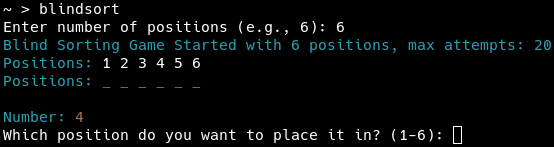
- Choose the number of positions (e.g., 6).
- Random numbers will be given to you.
- Place each number into an empty position.
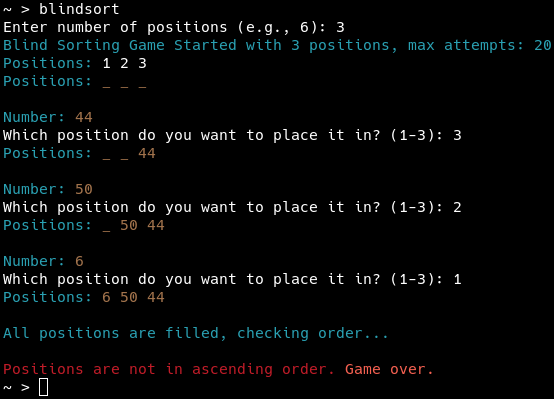
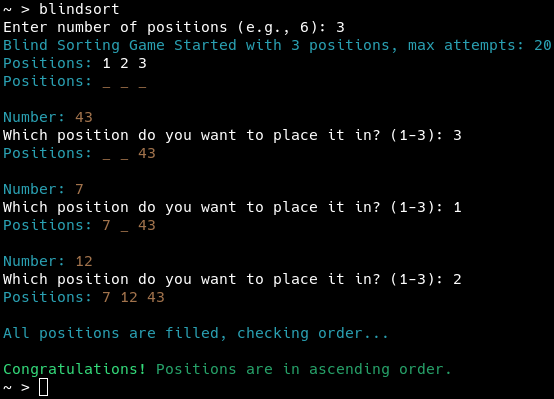
- When all positions are filled, the game checks if the numbers are sorted in ascending order.
- If sorted, you win; if not, you lose.
Additional commands
To check the current version of the game, run the following command:
blindsort --version
If you need help, run the following command:
blindsort --help
The commands above also support shorthand flags:
blindsort -v
blindsort -h
Screenshots
Credits
Forked from m3tozz/blindsort-tty without any license, CC0-1.0 license applied by default.
Game originally designed by m3tozz.